I found this class to be informative. Below is how I believe I have met the learning outcomes:
1. Contextualize how learning informs interactive and multimedia experiences
The research of learning in this realm is very interesting. I’ll try to summarize it:
Mayer’s theory of multimedia learning is that people take in multimedia and try to make understandable mental portrayals of the information (called Active Processing). People can process language and images at the same time, as these two things use different parts of the brain (called Dual Coding Theory). So with good design, one can provide more information (called Cognitive Load Theory) without overwhelming people. Source: Theories of Multimedia Learning
Mayer then took the theory and turned it into Principles of Multimedia Learning. This amazing chart helps explain all the principles described below. Source: Learning House, Multimedia Learning Principles (adapted from Mayer, Multimedia learning (2nd ed.). (Note to reader this link takes awhile to load, sometimes there seems to be not enough server capacity).
One principle to manage Intrinsic Load, which helps encourage learning, is Pre-training. The principles of Signaling, Redundancy, Contiguity and Coherency, can be used to reduce extraneous load for a reader (things that take away from learning). Finally ways to manage relevant load include: Personalization and Voice. These various principles are discussed directly below. Once you, as a producer of multi-media, understand the theory and the principles, they are very helpful in creating understandable and digestible visuals and multimedia that contribute to learning.
2. Apply multimedia design principles in planning your educational resources.
Pretraining – I love a good map. I learned and appreciated that this helps in learning. It is important to give a reader an idea of where things are headed. I highlighted this principle in my published suggestion comments for both Teni and Saksham, my group members, for their Draft adventures.
I also incorporated into my own multimedia piece by including an annotated map. below, at the outset to assist the reader.
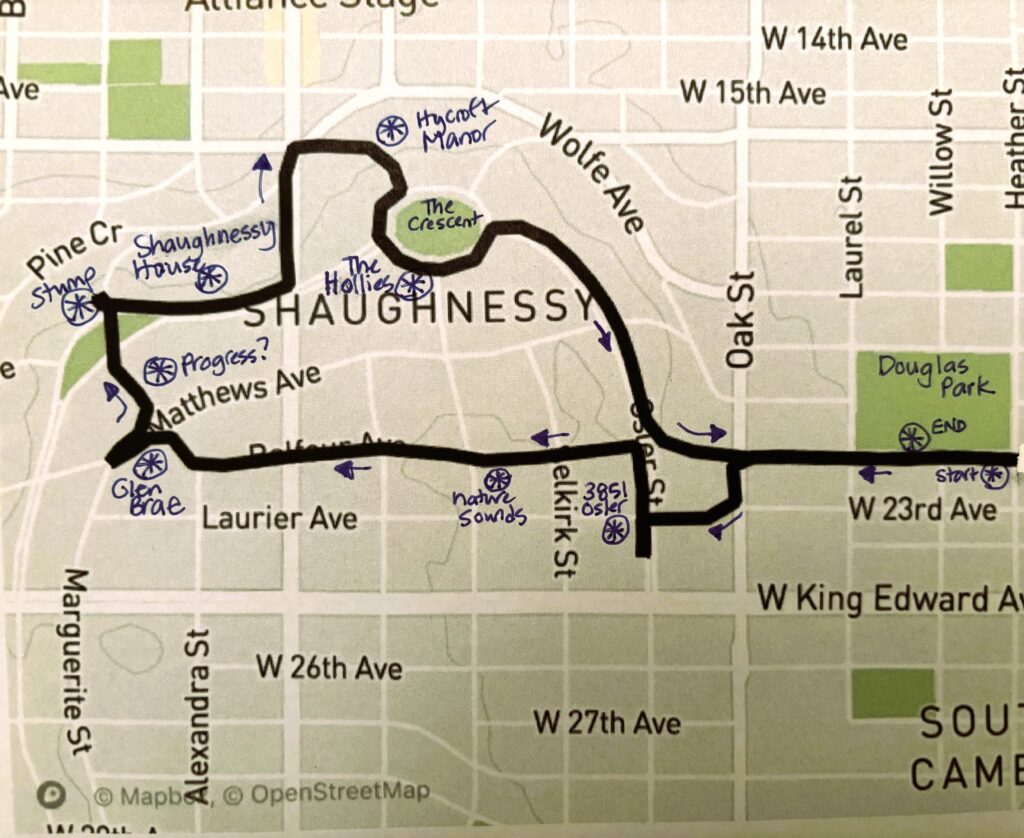
Signaling – This helps the reader appreciate transitions and also what is important that they need to pay attention to. In my map, mentioned above, I used arrows for our route and signaled the stops along the way. I leaned into the use of headings for my Final adventure and also use bold text in my various posts.
Redundancy – For every post I tried to reduce the text and make the writing succinct. When I began the Daily Creates, I really had to tap into my creative side. My first few posts were too disjointed, such as my post for Audio. As my learning grew in the course, I improved to ensure that my text was focused and my images were interesting and not too similar.
Contiguity – This principle is that people learn better when words and pictures are placed near each other. Headings are placed in close proximity to a graphic. My posts for Week 5, Multimedia leaned into this principle. All my headings were located directly below the visuals.
Coherency – Better learning occurs when extraneous materials are left out and not included. This involves using clean graphics, no background music. My whole EDCI 337 site is rooted in this principle. In this post, I have now just learned of using “separators” between the sections. These improve the site and I found improved its feel.
Personalization – This principle is that better learning occurs when conversational language is used, rather than formal language. My first Daily Create post on Text really meets this principle, as I am writing as if the reader is a good friend and I am sharing my challenge of getting out of bed.
One exercise was the “A week of remix.” It was a poem about the week (which my mother remembers being told). I have rewritten it, below, to show constant struggle to get myself out of bed and fully functioning!
Work to awake – by James Kuzyk
Mondays a slog to get awake
Tuesdays better, but little at stake
Wednesday is a swing, for
Thursday when I begin to win
Fridays great to end the week
Saturday fortunately able to sleep
Sunday chill, to start anew
Do it again, but still no clue.
Voice – This principle is that people learn better when the narration is done by a human voice. I leaned into this idea with my Mutimedia adventure, where I recorded narration for both the 3581 Osler photo and the Hycroft photo and then combined them for multimedia pieces, related to the murder of Janet Smith.
3. Engage in design thinking to create multimedia learning projects
I think I started to get into design thinking by Week 3. It is a challenge for me, as I have seen myself more as a “teckie” and less design oriented.
Turns out I do have the interest, when I begin to explore it. It began with my Week 3: shadow post, I really focused on design.

I improved with my monster art, where I explored adding interesting visuals to a picture.

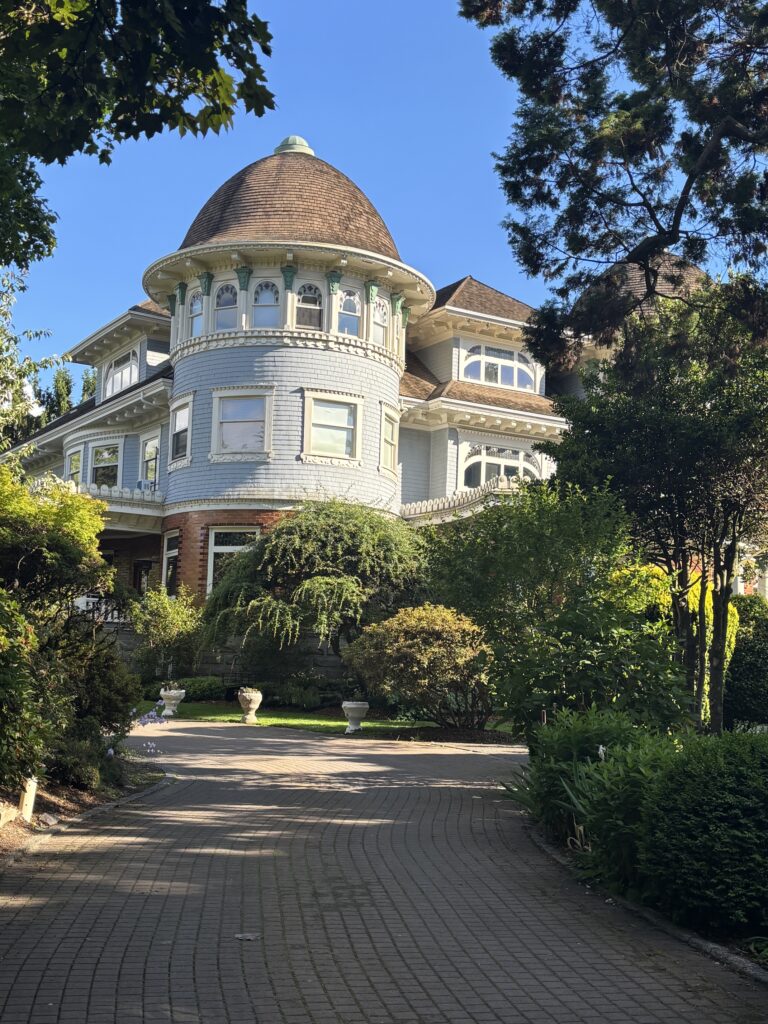
I also really love the photo below where I used the trees to help “frame” the house. It is also wonderfully contrasted with the brilliant blue sky.
Part of my growth was in exploring various programs to create the posts. For Week 5 I was able to combine audio files with images to create projects which could allow storytelling. My walk up song, below, is an example of this.
I thought about sounds found in a park, and used the initial Douglas Park photo and combined it with the ice cream truck sounds. The truck was too far away, but I was able to record it’s tune and combine it into multimedia.
4. Apply storytelling principles in creating effective learning opportunitites
For my multimedia story, I worked to incorporate storytelling principles. I tried to make my adventure interesting and detail the architecture and layout of an older world neighbourhood. One of my classmates, within my group provided the excellent suggestion of making the stops on my route be intentional. I included the murder of a younger Scottish girl and her link to two places on my tour to provide entertainment, intrigue and interest as it is Vancouver’s Oldest Cold Case.
I also worked to include audio only sounds in my work, as storytelling mechanism. The bird sounds during my adventure, found right in the heart of Vancouver, are magical and show the special characteristics of the area.
My work also includes revealing things about myself. It began on my About Me page where I provided basic information. It evolved when I joked about using Pretraining for a Squirrel, below. I understand through my learning that storytelling is connecting with a reader, personalizing work, seeking connections.
5. Describe and apply principles of effective interactive multimedia design.
Granchelli discusses how text + images can create better learning, due to dual-coding theory, discussed above. Source: https://cmadland.github.io/edci337/text+image.html
One example of this would be the annotated map. My initial draft included a very rudimentary map (on the left below) which did not even show the direction of my route and had no indication of stopping points for the reader. I really improved this with the map in my Final multimedia story, on the right, thereby illustrating the learning that I achieved.
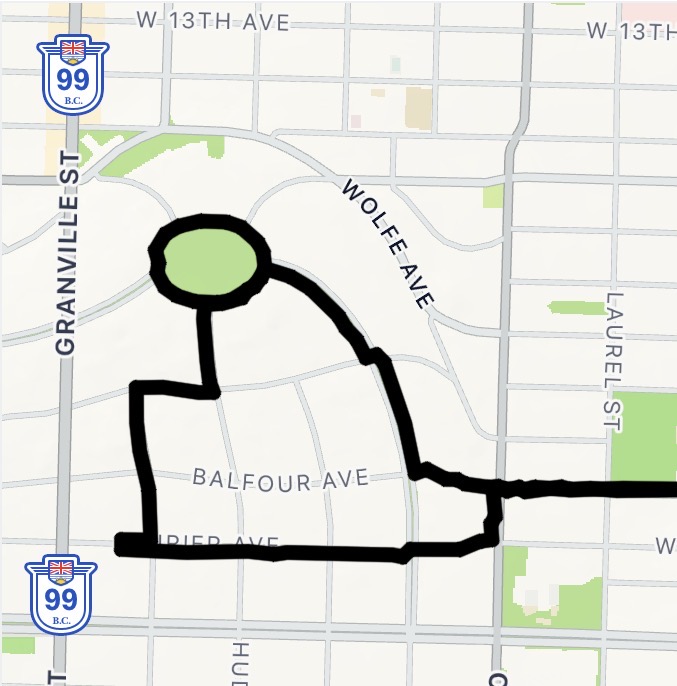
My final map provides route information while not overwhelming the reader. It also provides the function of providing Pretraining, through the arrows as well the stops to provide Signaling.
6. Generate a variety of prootype artifacts including: comics, videos and web pages
I am very pleased with how my EDCI 337 Word Press site page has turned out. The initial landing page is a picture of Christina Lake, where we often vacation.

The lake in the photo is like glass, reflecting the scattered clouds above. I picked this image to alert the reader that like this image, I too would work to be reflective.
My site is uncluttered and visually appealing. I learned how to use the Menu features, so all of my posts are available in the drop down menu (Posts, Multimedia Story Draft / Final, and Final Portfolio). I also worked to provide a variety of videos, both filmed videos, in my Daily Creates Video post, and video compilations. The video below is a creation of both my own still photo and a historical photo of the building, the Hollies.
7. Use GenAI as a tool
I used Google Gemini to begin my search of Vancouver 2021 census for the data visualization post. My initial pass included data that did not even have age bands, resulting in visuals which were misrepresentative, shown below.
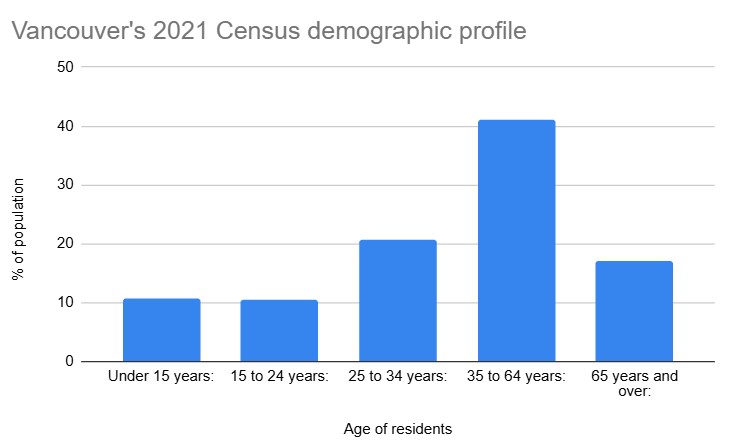
Upon greater review, I was able to produce an images which accuarately reflected the data.
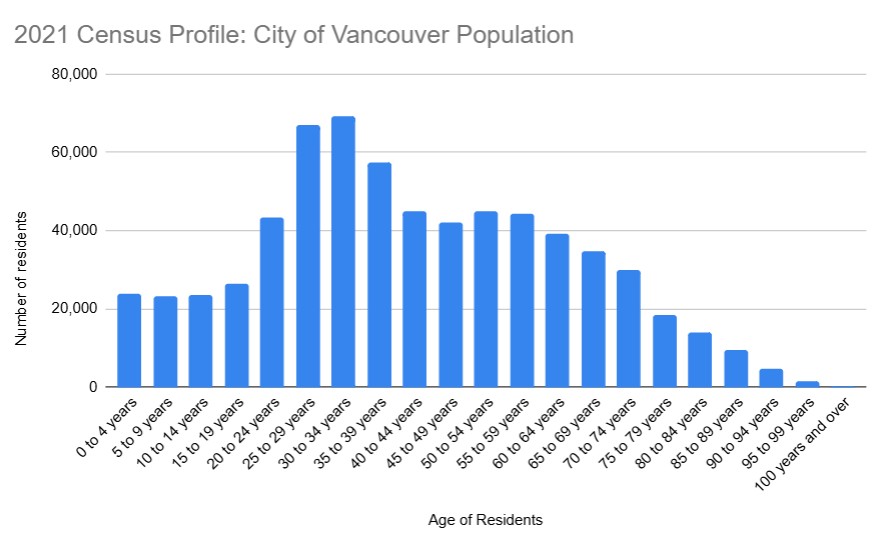
https://www12.statcan.gc.ca/census-recensement/2021/dp-pd/prof/details/page.cfm?Lang=E&SearchText=Vancouver&DGUIDlist=2021A00055915022,2021S051259150477&GENDERlist=1&STATISTIClist=1&HEADERlist=0
Through this I learned how critical it is to have accurate information in the first place and the need to question it. It is the old saying of “garbage in, garbage out.”
Challenges:
I have written out some of my challenges above. One of the challenges I faced was working with WordPress. Part of the journey was figuring out what it could do and its features. I also confess that I am a poor speller, and it has no spell check feature, often leaving me searching in other platforms.
Another challenge has been learning what is possible in today’s digital world and then accessing those resources. The landscape is changing quickly, so it will be beneficial if I can keep on top of resources to create the multimedia that I aspire to create.
Applicability for the Future:
I see this learning as having many applications for the future. Every time I do a presentation I will think of these principles. They are pretty understandable, yet so effective. I also have learned how to create multimedia to combine various types of media. This will be effective for my schooling as well as future employment. It is important to be able to present things that make it easier for others around me to understand and learn what I am trying to convey. This course has helped me achieve that aim.
References:
Forbidden Vancouver, Haunted Vancouver the Death of Janet Smith, 2017, The Daily Hive. https://dailyhive.com/vancouver/haunted-vancouver-the-death-of-janet-smith
Granchelli, Adrien. Text + Image. EDCI 337 Mirror Site, published by Colin Madland. Accessed June 24, 2026. https://cmadland.github.io/edci337/text+image.html
Kuzyk, James. EDCI 337 site.
Kuzyk, James. About Me. https://jamesk337.opened.ca/2026/05/16/hello-world/
Kuzyk, James. Daily Creates Week 1: Text. Accessed June 24, 2026. https://jamesk337.opened.ca/2026/05/25/writing/
Kuzyk, James. Daily Creates Week 2: Audio. Accessed June 24, 2026. https://jamesk337.opened.ca/2026/05/25/audio/
Kuzyk, James. Daily Creates Week 3: Images. Accessed June 24, 2026. https://jamesk337.opened.ca/2026/06/01/daily-creates-week-3-images/
Kuzyk, James. Daily Creates Week 4: Video. Accessed June 24, 2026. https://jamesk337.opened.ca/2026/06/07/daily-creates-week-4-video/
Kuzyk, James. Daily Creates Week 5: Multimedia. Accessed June 24, 2026. https://jamesk337.opened.ca/2026/06/15/daily-creates-week-5-multimedia/
Kuzyk, James. Daily Creates Week 6: Data Visualizations. Accessed June 24, 2026. https://jamesk337.opened.ca/2026/06/22/data-visualizations-week-5/
Kuzyk, James. Multimedia Story Draft. Accessed June 24, 2026. https://jamesk337.opened.ca/2026/05/26/assignment-1-multimedia-story-draft/
Kuzyk, James. Multimedia Story Final: A Walk Through History. Accessed June 24, 2026. https://jamesk337.opened.ca/2026/06/17/multimedia-story-a-walk-through-history/
Learning House, Multimedia Learning Principles (adapted from Mayer, Multimedia learning (2nd ed.). Accessed June 24, 2026. https://web.archive.org/web/20240228064458/https://ctl.wiley.com/wp-content/uploads/2016/07/MultimediaPrinciples_Summary.pdf (helpful link is from U Vic Ed site… seems to not always work if the servers are busy, but sometimes it does).
Saksham, MY FIRST BLOG. J Kuzyk comment, Accessed June 24, 2026. https://sakshamsharma.opened.ca/multimedia-story-draft/#comment-3
Stats Canada Census Profile, 2021 Census of Population
https://www12.statcan.gc.ca/census-recensement/2021/dp-pd/prof/details/page.cfm?Lang=E&SearchText=Vancouver&DGUIDlist=2021A00055915022,2021S051259150477&GENDERlist=1&STATISTIClist=1&HEADERlist=0
University of Victoria Educational Technologies. Theories of Multimedia learning. Accessed June 24, 2026. https://edtechuvic.ca/edci337/2025/09/05/theories-of-multimedia-learning/
Teniola, TENIOLA’S STORY. J Kuzyk comment, Accessed June 24, 2026. https://teniolagivesclues.opened.ca/2026/05/25/multimedia-story-draft/#comment-1
“The Hollies.” Vancouver Heritage Foundation, Vancouver Heritage Site Finder, www.heritagesitefinder.ca/location/1388-the-crescent-vancouver-bc. Accessed 09 June 2026.
Leave a Reply